



Many players face a Duplicate Login Error in Lost Ark when they try to play. However, if you are also one of them, then here is good news for all of you.
We have found some easy steps to fix the Lost Ark error. However, this is not a permanent fix. But the developer will fix the issue very soon in the next update. So let’s read on to fix the error for now.
Finally, the Lost Ark has arrived in both Europe and North America. Many people who play MMOs have been jealous of the South Korea-only game since it first came out in 2019.
However, it’s still hard to get into the Free-to-Play MMORPG. It turns out that some people have been waiting for five hours to get into Lost Ark.
There is also a new Duplicate Login error that is causing a lot of trouble even when people are online.
What’s even more disappointing is that people in the West haven’t been able to play Lost Ark yet. Even though these classes are only available in South Korea right now, they’re still very cool and will be for a long time.
How to Fix a Duplicate Login Error in Lost Ark?
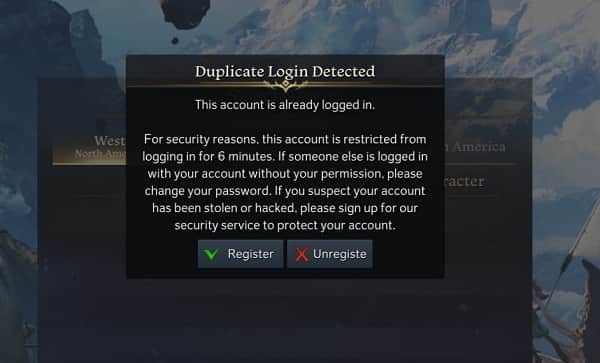
Many people say that when they try to log in to Lost Ark again after a crash, they get told that they’re playing with a Duplicate Account.
However, it looks like Lost Ark thinks the player is using the same account on many different devices. Therefore, it is less likely that people will want to share their accounts.
Then, it looks like the following steps will help you get back into Lost Ark and play again without problems. You might have to try a lot of things before you find the one that works for you, though.
- In your game library, right-click on Lost Ark and choose Properties. Then select “Local Files,” “Verify Game Files,” and choose “OK.”
- Turn off your computer completely before starting it up again and trying to fix it.
- Log out of Steam, then close both Lost Ark and Steam through Task Manager.
- In the meantime, Lost Ark’s servers will soon figure out that you aren’t online and will let you log in again.
- If not, uninstalling and reinstalling Lost Ark is the last thing you can do. If nothing works, you can contact the game’s support team.
Make sure to tell us in the comments below if there’s something you’ve found that works for you!
The development team for Lost Ark has already fixed the “unavailable region” error, and we’re sure they’re paying attention to this one as well. So let’s pray that a solution comes soon rather than later.

She is a freelance blogger, writer, and speaker, and writes for various entertainment magazines.